A server operations assistant for builders and operators

SSH terminal and AI
on one page

Connect a server, then ask what broke in plain English, or type the commands yourself. When you want ongoing checks, confirm monitors and start patrols.

  • 500 free AI requests each month
  • Unlimited servers
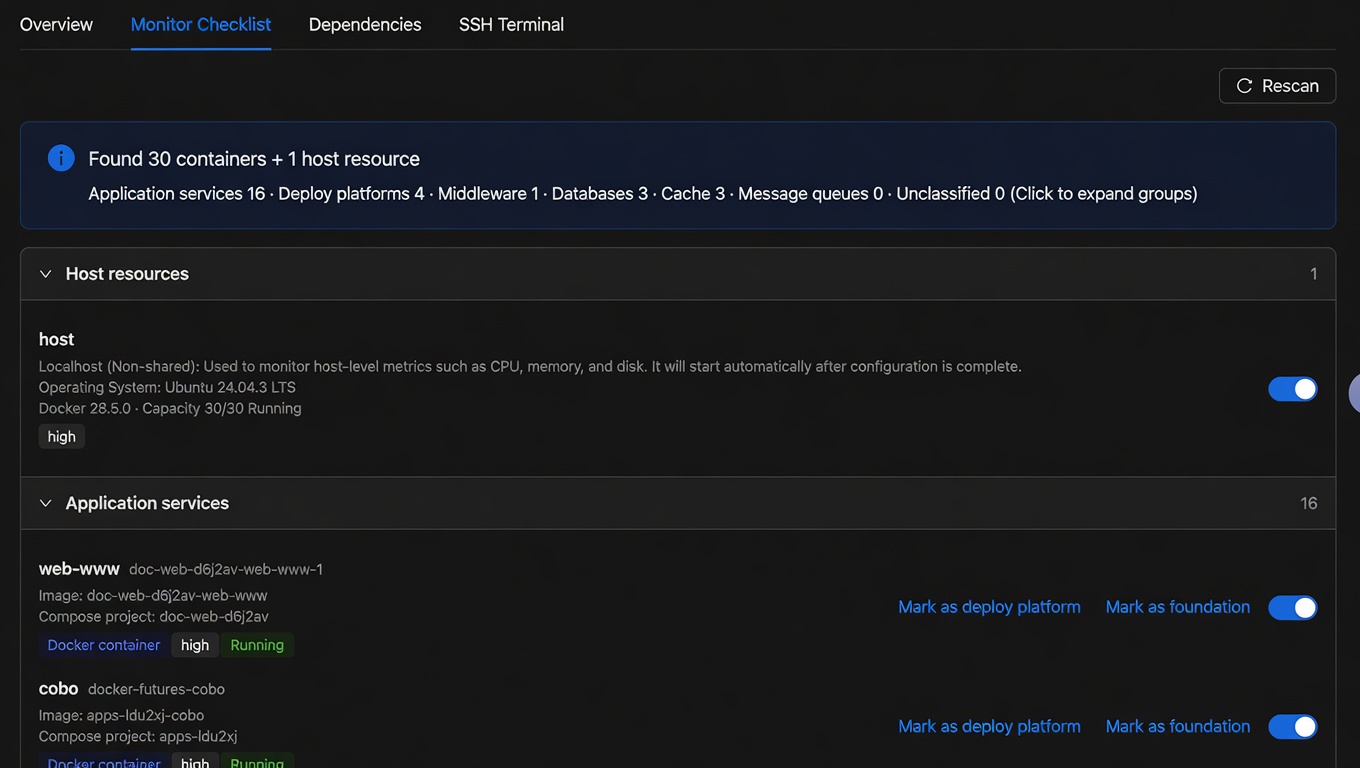
Monitor checklist: confirm which discovered services to keep checking
Confirm monitors, then patrol
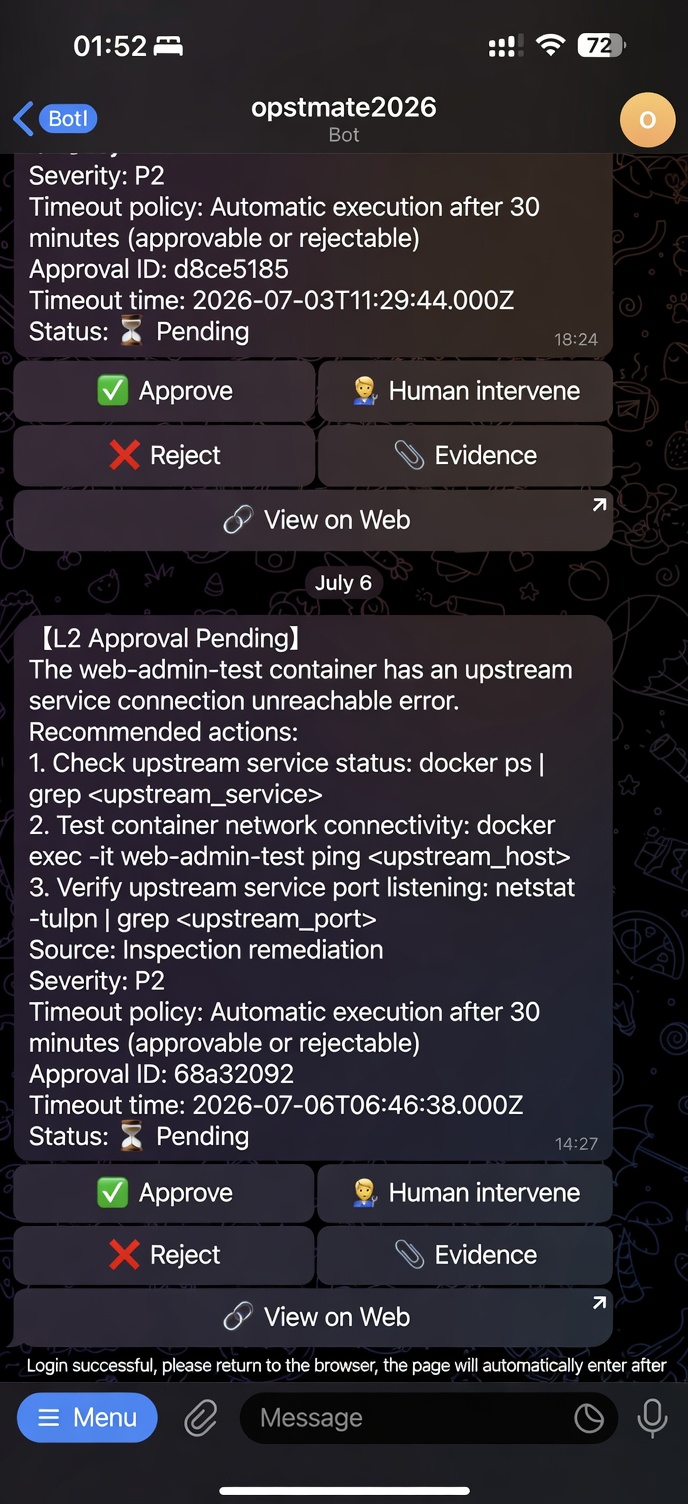
Patrol issues and suggested actions in a Telegram private chat
Review issues in a Telegram private chat

A real walkthrough

From connecting a server to choosing the next step

Use the product screens to see the full path from connecting a server to handling an anomaly.

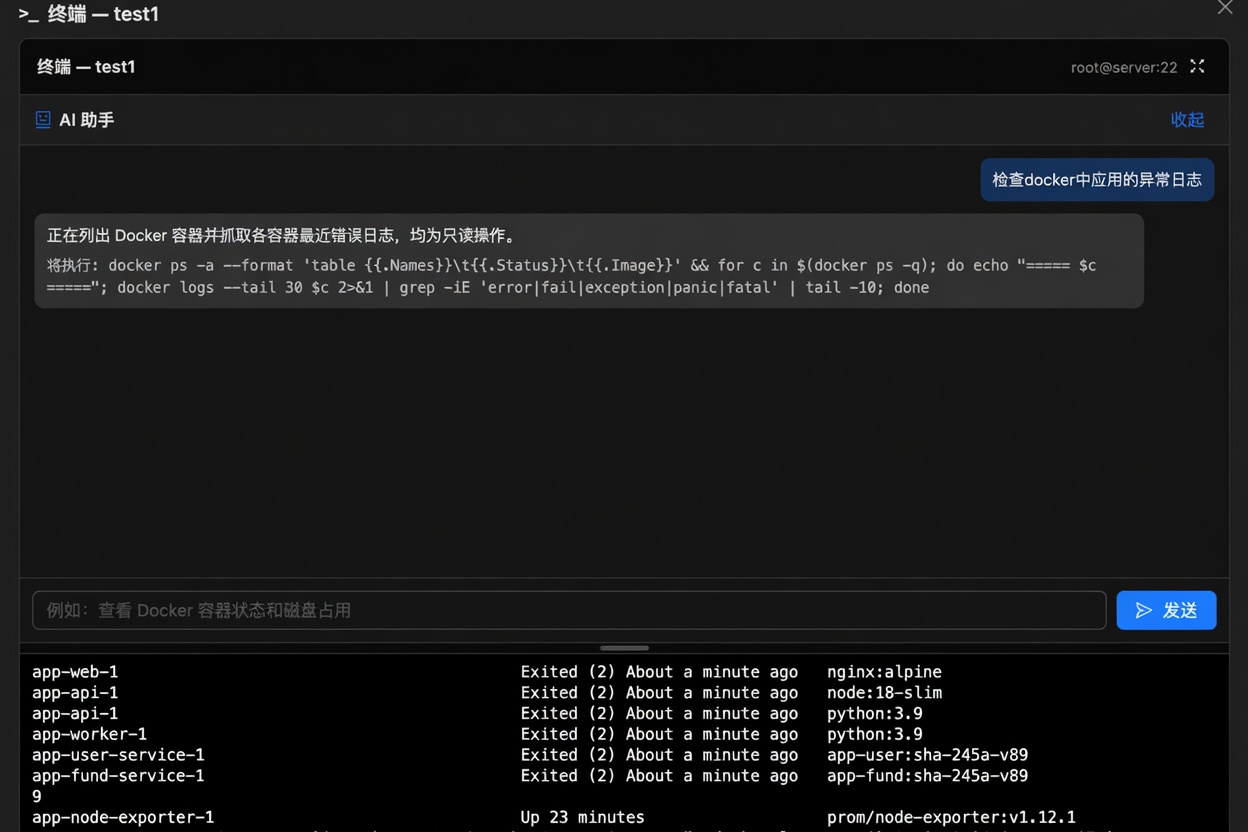
Help me inspect the app's error logs

  1. 01

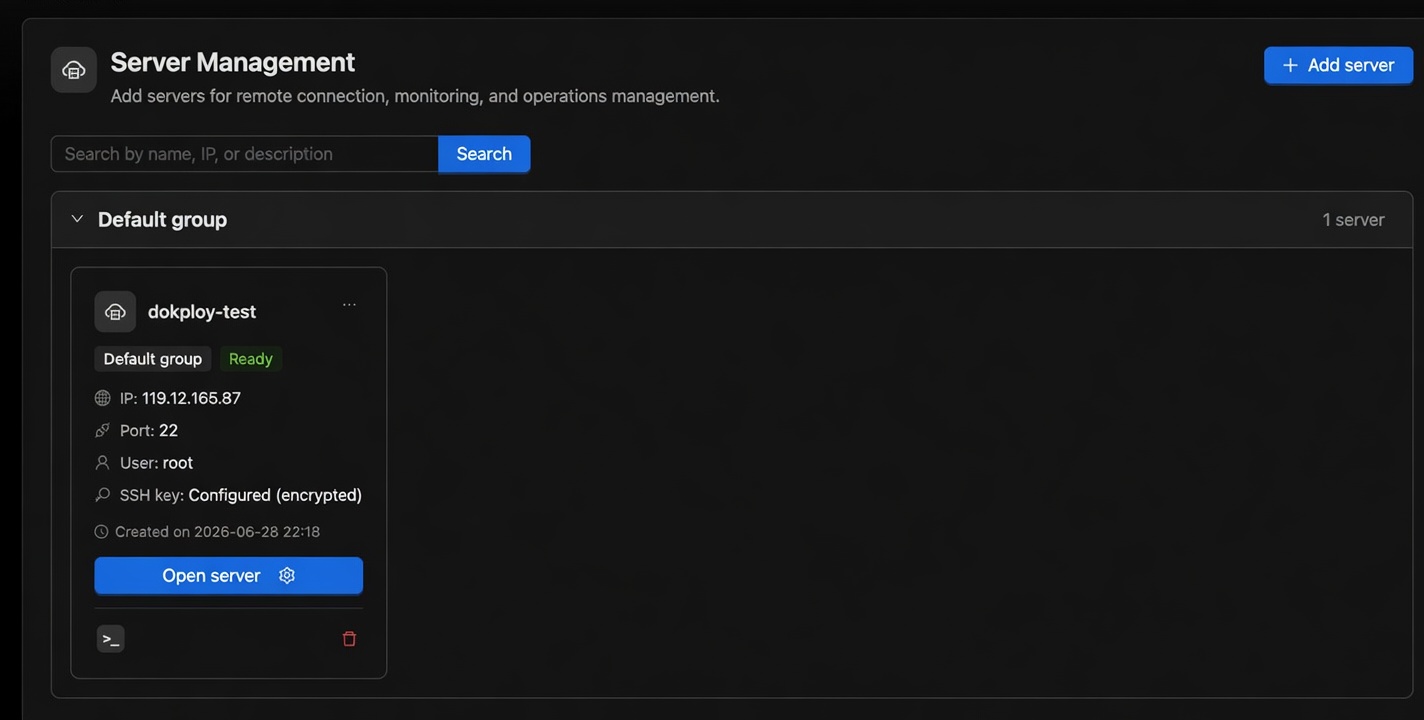
    Connect a server

    Add SSH details. Desktop credentials stay on the device by default; cloud hosting is an explicit choice.

    Server list
  2. 02

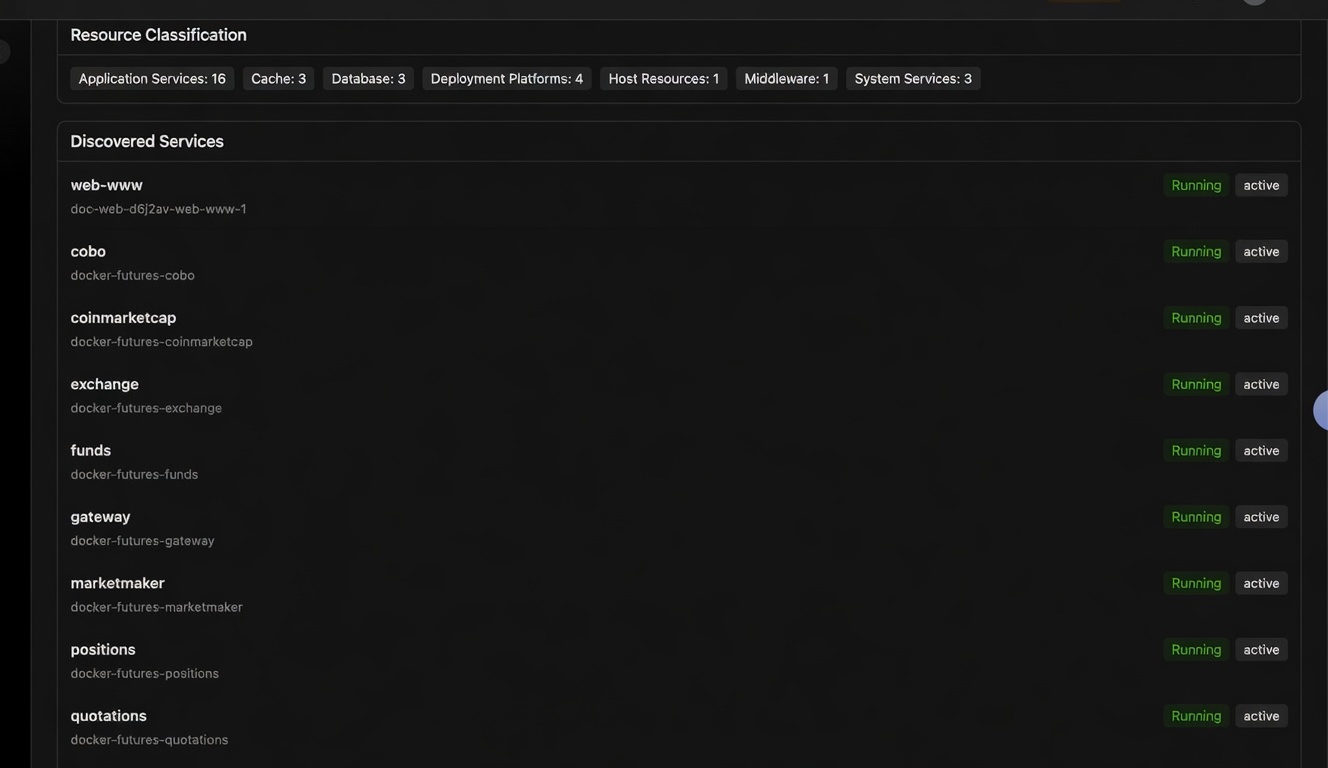
    Discover running services

    See containers, apps, databases, and caches so you know what the machine is running.

    Discovered services
  3. 03

    Confirm monitors, start patrols

    Checks are generated from discovery. Continuous patrols start after you confirm them.

    Monitor checklist confirmation
  4. 04

    Ask about anomalies in plain language

    For example: “Help me inspect the app's error logs.” You do not have to start from a memorized SSH recipe.

    Asking about error logs in the terminal AI, then seeing analysis and next steps
  5. 05

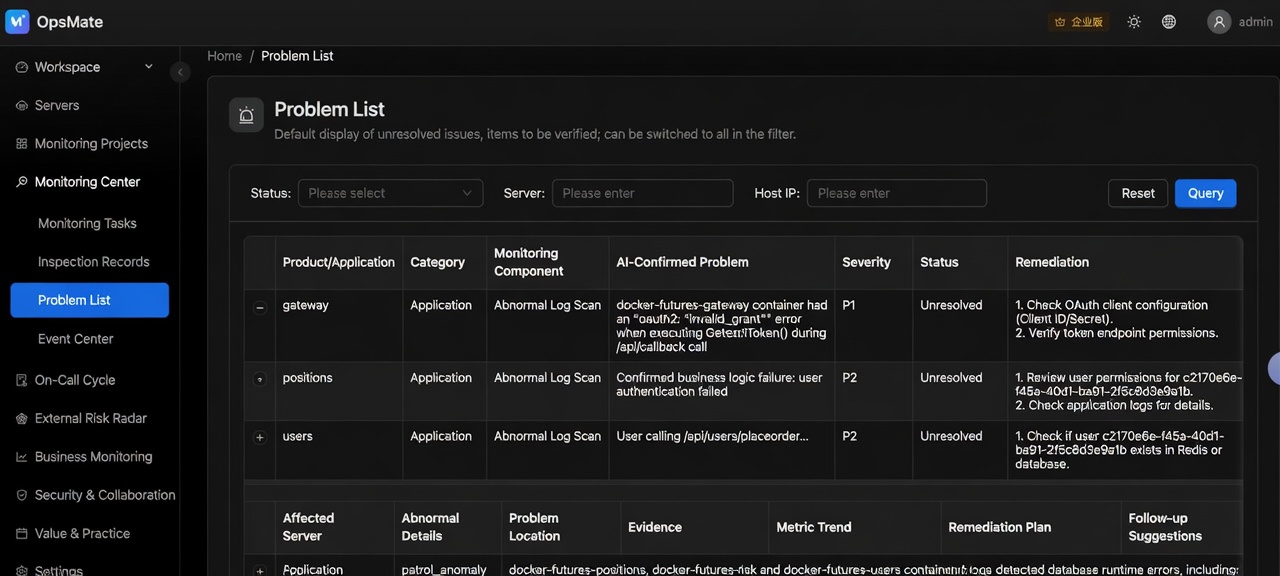
    See evidence and suggestions

    Related anomalies become one problem, with logs, check results, and suggested next steps.

    Problem list with suggestions
  6. 06

    Suggestions and fixes

    Accept, edit, or ignore a suggestion. Every action is sorted into one of three risk tiers. Low-risk actions (such as a confident service restart or log rotation) run automatically. Medium-risk actions (such as changing config or recreating a container) are sent to you for approval first, and run automatically if no one responds within 30 minutes. High-risk actions (database schema, kernel parameter, network and firewall changes) only raise an alert and are never executed. When the system isn't sure, it treats the action as the next tier up; commands that fail the safety check are blocked and never run, and every step is logged. Use a least-privilege account on production servers.

    Confirming a suggested action in Telegram private chat

Two audiences

Lower the setup bar, and cut repetitive operator work

AI gathers evidence and helps you decide the next step. It does not replace operators.

Developers and small teams who ship their own apps

After launch, you do not need a full monitoring stack first. Connect a server, confirm what was discovered, and inspect unusual logs in plain language.

  • See services, ports, and known component risks
  • Confirm monitors instead of writing rules from scratch
  • Get a log summary and suggestions before you change anything

Professional operators

Spend less time on repetitive patrols and evidence gathering. AI gathers evidence and suggests next steps. Every action is sorted into one of three risk tiers. Low-risk actions (such as a confident service restart or log rotation) run automatically. Medium-risk actions (such as changing config or recreating a container) are sent to you for approval first, and run automatically if no one responds within 30 minutes. High-risk actions (database schema, kernel parameter, network and firewall changes) only raise an alert and are never executed. When the system isn't sure, it treats the action as the next tier up; commands that fail the safety check are blocked and never run, and every step is logged. Use a least-privilege account on production servers.

  • Patrol results and anomaly evidence in one place
  • Related issues grouped across hosts
  • Suggestions can be approved, edited, or rejected, with an audit trail

Telegram

Check status on your phone. Sensitive work stays in private chat.

The official group can host the bot for introductions. Server lists, patrols, problems, and AI-assisted SSH happen only in a private chat with the bot. Group chat cannot manage servers.

  • Status, patrols, problems

    After you bind your account, review runtime status, patrol records, and open problems in private chat.

  • AI-assisted SSH

    You can troubleshoot with AI in private chat only if the cloud already has that server's credentials. Binding Telegram is not enough when the key stays only on your computer.

  • Group-chat boundary

    Groups are for welcome text and orientation. Server data and sensitive actions are not completed in the group.

Join the Telegram community
Problems and suggestions in a Telegram private chat

Desktop · Open source

Credentials kept on this device, with a clear cloud data boundary

The standalone desktop client is open source under MPL-2.0. SSH keys and passwords stay in a local encrypted vault by default. Sign-in, monitoring, and AI still go through app.itops.sh. Open source lets you review the client; it is not a third-party security audit.

macOS and Linux prerelease · Windows coming soon

  1. Local credential vault

    SSH keys and passwords stay in the encrypted vault on this device by default and are never uploaded automatically.

  2. Cloud hosting is opt-in

    Unattended patrols after the computer is off require credentials you explicitly host in the cloud. Keep production credentials local unless you choose otherwise.

  3. AI can still see logs

    Cloud AI may receive related logs, terminal output, or patrol summaries. Private keys are not sent to the model as SSH credentials.

  4. What is open source

    The standalone desktop client is open source. The OpsMate cloud SaaS is not.

Pricing

Stay on Free forever. Subscribe by the unit when you need more AI.

Free has no trial window and no server cap. A subscription only adds AI quota; it does not unlock menus or other features. Enterprise complete capabilities and private deployment are quoted.

Free

$0

Permanently free

  • Connect servers, discover services, confirm monitors, and patrol
  • 500 free AI requests each month
  • Unlimited servers
  • Telegram private chat for status, patrols, and problems
  • When AI quota runs out, only AI pauses; everything else keeps working
Start free

Enterprise

Contact us

Full platform · private deployment

  • Delivered by contract with the complete Enterprise feature set
  • Private deployment available
  • Team governance, on-call, and review workflows
  • SSO, longer audit retention, and a support channel
  • Quoted for deployment and support; no public price
Contact us

What counts as one AI request

One complete model request counts as 1, totaled by UTC calendar month. In the terminal, running commands and then analyzing their output counts as another request. SSH patrol checks themselves do not consume quota; AI summaries of patrol results or logs do. The counter resets at the start of each UTC month.

Recommended troubleshooting guides

Your app is failing. Where do you start?

Collect evidence before changing a service. These steps work with or without OpsMate.

Check logs without memorizing commands: one-sentence AI and a real terminal

On one screen, ask AI to check the logs, or type the command yourself and verify the evidence.

Read the guide →

Away from your desk: get server alerts in Telegram, then follow up in plain language

Away from your desk? Read the patrol alert in a private Telegram chat, then gather evidence with AI before deciding what to do.

Read the guide →

Docker exit code 1, 137, 139, 255: why a container exits immediately

What exit codes 0, 1, 125-127, 137, 139 and 143 mean, what to check next, and what each code does not prove.

Read the guide →

Exit code 137 and OOMKilled: was your container out of memory, or killed by something else?

Exit code 137 means SIGKILL: often out of memory, not always. Check OOMKilled, docker events and kernel logs.

Read the guide →

Contractor or ex-employee left? How to revoke their server access

Check who can still log in, lock their account without locking yourself out, and change the passwords and keys they saw.

Read the guide →

Inherited a server: what to check first when you have no ops hire

Inventory services, ports, containers, cron jobs, backups and certs. Write one page, then run a weekly check.

Read the guide →

Docker container keeps restarting? Break the restart loop

Separate startup errors, unavailable dependencies and memory pressure before restarting again. Includes read-only commands and an AI troubleshooting prompt.

Read the troubleshooting guide →

Investigate sudden disk-usage spikes, or open all troubleshooting guides.

FAQ

Credentials, AI data, and patrol boundaries

Are credentials uploaded?

On desktop, SSH keys and passwords stay in the local encrypted vault by default and are not uploaded automatically. They reach the cloud only if you explicitly choose cloud hosting. Credentials added in the web console are cloud-hosted.

What data does AI receive?

Cloud AI may receive your question, recent terminal output, patrol summaries, or related log excerpts. OpsMate attempts to redact secret-looking material first, but redaction isn't guaranteed, so remove sensitive information yourself. SSH private keys are not provided to the model as connection credentials. Keeping credentials on-device does not mean all data stays on-device.

Can patrols continue if my computer is off?

Yes, if the cloud has the connection details it needs and that server's credentials are hosted in the cloud. If credentials exist only on a computer that is off, the cloud cannot keep connecting for unattended patrols.

What does Telegram require?

Bind your Telegram account and talk to the official bot in a private chat. Status, patrols, and problems only need that binding. AI-assisted SSH also needs the cloud to reach the host: credentials must be cloud-hosted (added in the web console, or explicitly uploaded from desktop). If the key stays only on your computer, binding Telegram does not let you operate that server remotely. The group is for introductions only and cannot manage servers.

Does AI change servers by itself?

AI gathers evidence and suggests next steps, and patrols run check commands automatically. Every action is sorted into one of three risk tiers. Low-risk actions (such as a confident service restart or log rotation) run automatically. Medium-risk actions (such as changing config or recreating a container) are sent to you for approval first, and run automatically if no one responds within 30 minutes. High-risk actions (database schema, kernel parameter, network and firewall changes) only raise an alert and are never executed. When the system isn't sure, it treats the action as the next tier up; commands that fail the safety check are blocked and never run, and every step is logged. Use a least-privilege account on production servers.

What happens when free AI quota runs out?

Only AI pauses. Server views, patrol records, problems, and non-AI Telegram actions keep working. Subscribe by the unit when you need more requests.

Connect the first server

Free stays free, with unlimited servers. Subscribe by the unit for more AI. Contact us for complete Enterprise capabilities.

Registration and subscriptions happen in the console · payments by Stripe